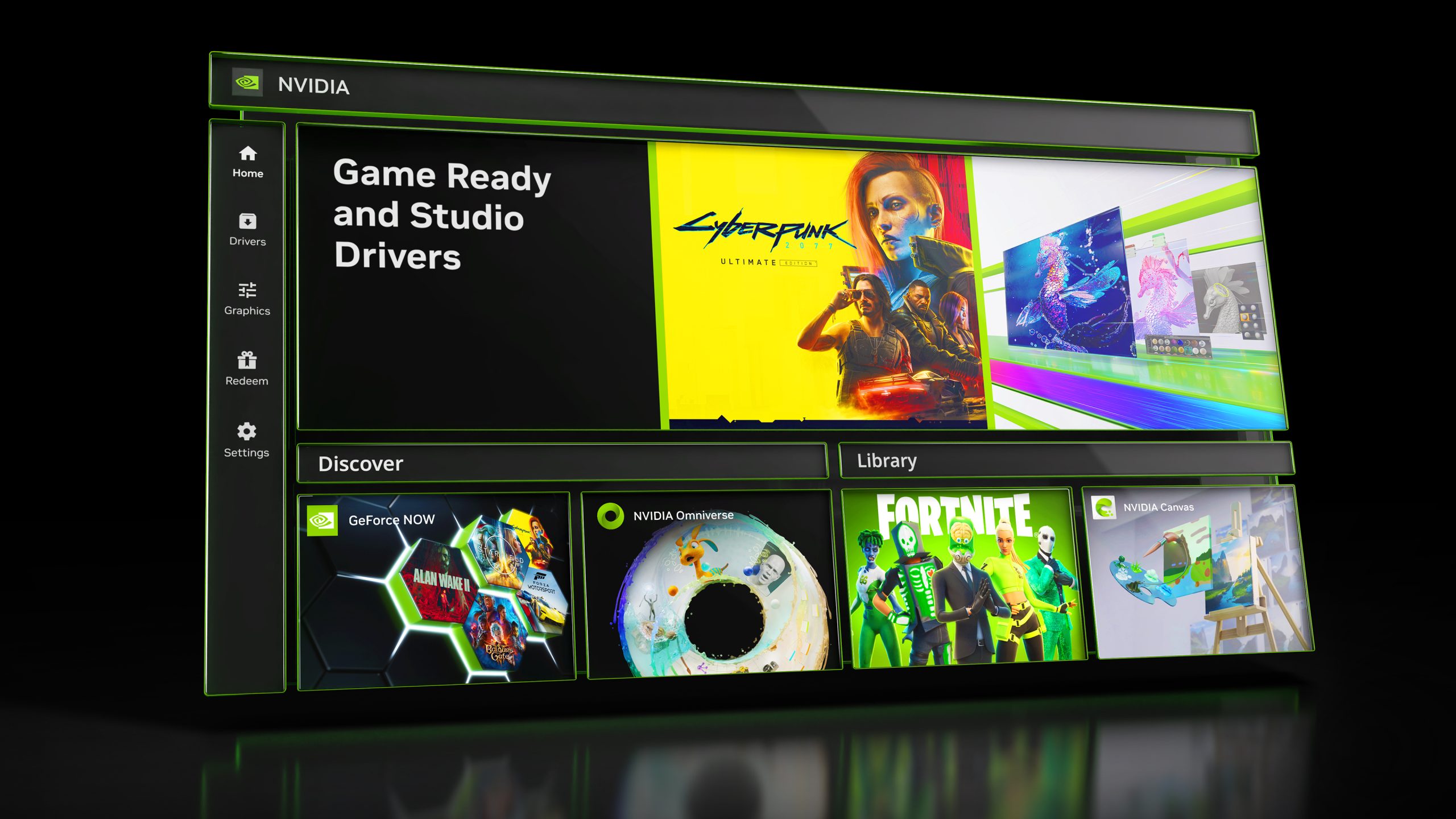
Nvidia’s 20-year-old GeForce Control Panel is officially dead after today’s driver update, marking the end of an era for PC gamers and creators. The company’s shift to its unified Nvidia app—already housing driver downloads, game settings, and DLSS controls—leaves only RTX PRO users with lingering access to the legacy tool. But the real story isn’t nostalgia: it’s what comes next for Nvidia’s AI-driven graphics future, where DLSS 5 and real-time neural rendering hint at a more ambitious (and controversial) roadmap.
The Control Panel’s Obituary: A Quiet Goodbye After Two Decades
Nvidia’s announcement today isn’t just a software update—it’s the formal retirement of a product that defined PC graphics management for millions. The GeForce Control Panel, which debuted in 2006 alongside Nvidia’s first RTX GPUs, has been phased out with the release of driver version 610.47 WHQL. While the app will still lurk on users’ machines post-install (and remain downloadable via the Microsoft Store), Nvidia has made it clear: no new features, no bug fixes, and no future support. For most gamers, this means the transition to the Nvidia app—a consolidation of driver management, gaming profiles, and AI-powered tools like DLSS—is now complete.
But here’s the catch: RTX PRO users aren’t getting the boot just yet. Nvidia confirmed to The Verge that the Control Panel will remain supported for professional users until their features migrate to the Nvidia app. This dual-track approach reflects Nvidia’s strategy of treating consumer and enterprise workflows as distinct ecosystems—even as it pushes both toward a unified interface.
What’s Actually Changing (and What’s Not)
For the average PC user, the shift from Control Panel to Nvidia app is more about consolidation than disruption.

- Driver downloads and updates (previously a separate step)
- Game-ready presets for titles like 007 First Light, LEGO Batman: Legacy of the Dark Knight, and EA SPORTS F1 25: 2026 Season Pack (all supported in the new driver)
- DLSS and Reflex toggles, now integrated with game profiles
- Multi-monitor and V-SYNC settings, with fixes for stability issues flagged in the latest update
The real friction comes from power users who relied on the Control Panel’s granular controls—think overclocking tweaks, advanced GPU profiling, or third-party tool compatibility. Nvidia’s app, while sleeker, lacks some of the deep customization options that made the Control Panel a power user’s Swiss Army knife. As TechPowerUp notes, this transition forces gamers to adapt—or risk missing out on future features locked behind the new interface.
DLSS 5: The Elephant in the Room
Beneath the surface of today’s driver update lies something far more ambitious—and far more controversial. Hidden in the code of version 610.47 are the first traces of DLSS 5, Nvidia’s next-gen AI upscaling technology. While the feature isn’t yet functional (and can’t be enabled manually), its presence signals Nvidia’s commitment to pushing AI rendering into uncharted territory. As DSO Gaming reports, DLSS 5 promises to go beyond traditional upscaling by injecting photoreal lighting and materials into rendered scenes—effectively turning games into interactive VFX showcases.
The catch? DLSS 5 won’t arrive until Fall 2026, and its launch is tied to a carefully curated list of titles—including Assassin’s Creed Shadows, Starfield, and Hogwarts Legacy. Nvidia’s bet here is that developers will embrace the technology as a way to achieve Hollywood-quality visuals in real time. But the gamble is risky: early criticism of DLSS 3’s performance trade-offs lingers, and DLSS 5’s reliance on neural rendering could alienate users who prioritize raw FPS over cinematic effects.
What’s clear is that Nvidia is doubling down on AI as the core of its graphics strategy. The Control Panel’s retirement isn’t just about software housekeeping—it’s a signal that the company’s future lies in tools like the Nvidia app, where AI features (DLSS, Reflex, and now DLSS 5) take center stage. For gamers, this means getting comfortable with an ecosystem where hardware and software are increasingly intertwined—and where Nvidia’s roadmap is as much about AI as it is about raw performance.
The Bigger Picture: Why This Matters for Nvidia’s AI Ambitions
Nvidia’s move to unify its software ecosystem under the Nvidia app isn’t just about tidying up legacy code. It’s a strategic pivot toward AI-driven workflows, where every interaction—from driver updates to game settings—is optimized for its CUDA and RTX hardware.

- Reducing fragmentation: A single app means fewer compatibility issues and a smoother user experience across Nvidia’s product line.
- Pushing AI adoption: Features like DLSS 5 and real-time neural rendering require the Nvidia app’s infrastructure to function. The Control Panel’s demise removes a potential roadblock.
- Future-proofing for RTX 5000 series: As Nvidia prepares to launch its next-gen GPUs (rumored for late 2026), the unified app will be the primary interface for managing their advanced features.
Yet the transition isn’t without risks. Power users and modders may resist the shift, especially if the Nvidia app lacks the depth of the Control Panel. And with DLSS 5’s arrival still months away, skepticism remains about whether the technology will deliver on its promises—or whether it’ll repeat the performance controversies of earlier DLSS iterations.
What Happens Next: The Road Ahead for Gamers and Creators
The Control Panel’s retirement is just the beginning.
- DLSS 5’s debut: Fall 2026 will be the acid test for Nvidia’s AI ambitions. If the technology delivers on its photorealism claims without crippling performance, it could redefine PC gaming. If not, it risks becoming another DLSS misstep.
- RTX 5000 series launch: Expect Nvidia to unveil its next-gen GPUs later this year, with the Nvidia app as the primary management tool. Legacy support for the Control Panel will likely fade entirely.
- Professional adoption: RTX PRO users will eventually migrate to the Nvidia app, but the timeline remains unclear. Enterprise workflows may resist change longer than consumer markets.
- Third-party tool compatibility: Tools like MSI Afterburner and EVGA Precision may need updates to integrate with the Nvidia app, potentially disrupting overclocking communities.
- Update to the latest driver (610.47 WHQL) to ensure compatibility with new games like 007 First Light and World of Tanks: HEAT.
- Familiarize themselves with the Nvidia app, especially if they rely on advanced settings.
- Monitor DLSS 5 announcements—its arrival will be a defining moment for Nvidia’s AI strategy.
- Prepare for potential growing pains as third-party tools adapt to the new ecosystem.
The Control Panel’s death isn’t the end of an era—it’s the prelude to Nvidia’s next chapter. And whether that chapter is a triumph of AI-driven graphics or a cautionary tale about overpromising, one thing is certain: the company is betting big on a future where software and hardware are inseparable. For users, that means embracing change—or risk being left behind.
